
Binary Search Algorithm

What is a Binary Search?

The class below implements and tests a binary search algorithm. A binary search works by taking a sorted array and repeatedly taking the middle element of the array. If the middle element is the target, the index is returned. If the target is lower than the middle element, it proceeds to search the midpoint of the elements left of the last midpoint. If the target is higher than the middle element, it proceeds to search the midpoint of the elements higher than the last midpoint.

How Does it Perform?

This divides the result set in half on each search attempt which makes it log(n) performance.  To put this in perspective, this means you can find the target element in a one-billion record array within 30 iterations (30 being the worst case scenario).

public class BinarySearch {

     //Perform binary search if the provided array actually
     //contains values.
     public static int binarySearch(int[] a, int target) {
         if (a == null || a.length == 0) return -1;
         return binarySearch(a, target, 0, a.length - 1);
     }

     //Recursive binary search algorithm taking in the array,
     //target value, and the start and end indices (inclusive
     //end is the last element, not one past the last element.
     private static int binarySearch(int[] a, int target,
             int start, int end) {

         //If we're at the last element, check it against the target.
         //Return index on match and -1 on failure.
         if (start == end) return a[start] == target ? start : -1;

         //Get the midpoint index and the value present in it.
         int midIndex = (start + end) / 2;
         int midValue = a[midIndex];

         //If the midpoint is the target, return its index.
         if (midValue == target) return midIndex;

         //If the midpoint wasn't the target, recurse to look lower
         //if the value was less than the middle value or recurse to
         //search higher if the value was greater than the midpoint.
         if (target < midValue)
             return binarySearch(a, target, start, midIndex - 1);

         return binarySearch(a, target, midIndex + 1, end);
     }

     //Test the algorithm and throw an exception on failure.  This
     //should be a JUnit test, but it is being left as a main in
     //this class to make the example standalone.
     public static void main(String[] args) throws Exception{

         //Make a sample array - must be sorted for search to work.
         int[] a = { 1, 4, 7, 9, 13, 15, 18, 21, 37, 56, 72 };

         final String error = "Unexpected result, algorithm failed.";

         //Run test assertions.
         if(!(binarySearch(a, 9) == 3)) throw new Exception(error);
         if(!(binarySearch(a, 4) == 1)) throw new Exception(error);
         if(!(binarySearch(a, 7) == 2)) throw new Exception(error);
         if(!(binarySearch(a, 1) == 0)) throw new Exception(error);
         if(!(binarySearch(a, 13) == 4)) throw new Exception(error);
         if(!(binarySearch(a, 15) == 5)) throw new Exception(error);
         if(!(binarySearch(a, 18) == 6)) throw new Exception(error);
         if(!(binarySearch(a, 21) == 7)) throw new Exception(error);
         if(!(binarySearch(a, 37) == 8)) throw new Exception(error);
         if(!(binarySearch(a, 56) == 9)) throw new Exception(error);
         if(!(binarySearch(a, 72) == 10)) throw new Exception(error);

         //Test some cases that should return -1 (not found).
         if(!(binarySearch(a, 27) == -1)) throw new Exception(error);
         if(!(binarySearch(a, 10) == -1)) throw new Exception(error);

         //Print the success log.
         System.out.println("All results were as expected.");
     }
 }
Dijkstra’s Algorithm (Java)

Dijkstra’s algorithm finds the shortest path from a source node to a target node in an undirected or directed graph.

It’s actually a pretty simple algorithm once you break it down properly.

Solution Explanation

It would be fair to summarize the entire solution as “do a breadth-first search of the graph from the source node and as we process each edge, update its target node if we have found a faster path to it with that edge.”

The specific steps in this approach can be implemented as follows:

  1. Give all nodes in the graph a value of Integer.MAX_VALUE to indicate they have not been visited.  Also, set their parent node index to -1 to indicate that we haven’t found their parent yet in the shortest path solution.
  2. Give the node you are starting from a value of 0.
  3. Put all nodes into a minimum priority queue (a data structure that always gives the minimum cost element out next).  The starting node will automatically be the first in the queue as it has value 0.
  4. While the queue is not empty:
    • Take the next node N from the queue.
    • If N the target/destination node then we’re done the hard part!  Record that we found the target and break.
    • Otherwise, loop over each edge E in N‘s adjacency list.  We’ll call the node E points to P.
      • If the cost( node N + edge ) < cost( node ), then:
        • Set the parent of node P to node N.  This means that we just found a better route from the source to node P.
        • Also, set the new cost of P to cost( node N + edge ).
        • Also, remove and re-add P to the priority queue as we lowered its cost.  This will change its place in the queue.
  5. Assuming we did find the target node earlier, now we just have to print out the results.  To do this, we just start at the target node and follow the parent indexes backwards to the source node (which will still have -1 as its parent).

Implementation

import java.util.*;

public class Dijkstra {

    public static final int V = 5;

    private static class Node {
        int minimumPathCost;
        int node;
        int prev;
    }

    private static class Edge {
        public int weight;
        public int next;
        public Edge(int w, int n) {
            weight = w;
            next = n;
        }
    }

    //Undirected graph, have to add edges in both directions.
    public static void addEdge(List<List<Edge>> graph, int src, int dest, int weight) {
        graph.get(src).add(new Edge(weight, dest));
        graph.get(dest).add(new Edge(weight, src));
    }

    public static List<Integer> dijkstra(List<List<Edge>> graph, int source, int target) {

        //Add all to priority queue
        PriorityQueue<Node> q = new PriorityQueue<>(Comparator.comparingInt(o -> o.minimumPathCost));
        Node nodes[] = new Node[V];
        for (int i = 0; i < V; ++i) {
            Node n = new Node();
            n.minimumPathCost = i == source ? 0 : Integer.MAX_VALUE;
            n.node = i;
            n.prev = -1;
            nodes[i] = n;
            q.add(n);
        }

        //While queue not empty, take next node, visit all adjacent
        //nodes, set their minimumPathCost to be this node's minimumPathCost + the cost
        //of getting to the node (if that's less than the current wight).
        //Also, when updating the minimumPathCost, record the source node.
        while (!q.isEmpty()) {
            Node c = q.remove();
            if (c.node == target || c.minimumPathCost == Integer.MAX_VALUE) {
                break;
            }

            for (Edge e : graph.get(c.node)) {
                int newWeight = c.minimumPathCost + e.weight;
                if (newWeight < nodes[e.next].minimumPathCost) {
                    nodes[e.next].minimumPathCost = newWeight;
                    nodes[e.next].prev = c.node;
                    q.remove(nodes[e.next]);
                    q.add(nodes[e.next]);
                }
            }
        }

        //Rebuild the path from the source node to the target node.
        List<Integer> path = new ArrayList<>();
        int current = target;
        while(current != -1) {
            path.add(current);
            current = nodes[current].prev;
        }
        Collections.reverse(path);
        return path;
    }

    public static void main(String[] args) {

        //Build a sample graph. The most efficient
        //solution from 0 ->4 is [0 -> 2 -> 3 -> 4].
        List<List<Edge>> graph = new ArrayList<>();
        for (int i = 0; i < V; ++i) {
            graph.add(new ArrayList<>());
        }
        addEdge(graph, 0, 2, 2);
        addEdge(graph, 0, 1, 18);
        addEdge(graph, 1, 3, 1);
        addEdge(graph, 2, 3, 3);
        addEdge(graph, 2, 4, 9);
        addEdge(graph, 3, 4, 1);

        //Execute the algorithm and print the solution path.
        System.out.println(dijkstra(graph, 0, 4));
    }
}


Verify New Code w/ Debugger & Loggers!

Quick Summary

This is just a short post that shows a real-life example of why it is often good to view the debug log and check things out in the debugger even when things seem to be working fine.

The Bug

Today I found a very small bug in some code with a very large impact (thankfully in our development environment).

Some Java code was mapping namespace strings to IDs.  It did this by:

  • Checking a cache for the mapping.
  • Checking the database for the mapping if it didn’t exist in the cache.
  • Creating the mapping in the DB if it didn’t exist and putting it into the cache.

This had all been working great… until I refactored it to allow nested namespaces.  Suddenly, the namespace being used in the key wasn’t a string, it was an object!

We were building the cache key explicitly by adding the namespace to the value.  So, the fix was as simple as adding a toString() method to the new namespace class.  Without that, the toString() method had the instance reference, and every single item coming in was therefore unique!

So… effectively we got no caching and had our caches growing rapidly with useless data (the second part of which was somewhat okay as they were LRU caches).

 Finding the Bug

This bug definitely could have been found with unit tests had one been there.  But… one wasn’t. We noticed the bug when a consumer dumped millions of records of data against our environment and pointed out that it was vastly slower than it had been before.

It was still working in a way that got it past our general testing; it was just slower.

Once the consumer pointed this out, I turned on debug logging and immediately saw that every single record was incurring the overhead of 6 database calls, even though this should have stopped after the first thousand records or so triggered data caching.

Sending just one request against my IDE immediately showed that the cache key we were using was garbage as per the reasons noted above.

Lesson Learned!

It immediately occurred to me how silly it is that I no longer had debug logging on in my IDE.  Also, on top of that, it occurred to me how silly it is that I don’t habitually take 30 seconds to watch the new code execute in a debugger just to verify it does what I intended.

Again, unit tests would catch many of these situations… but some standard debug logging and debugger checks can definitely help to significantly limit errors in new code.


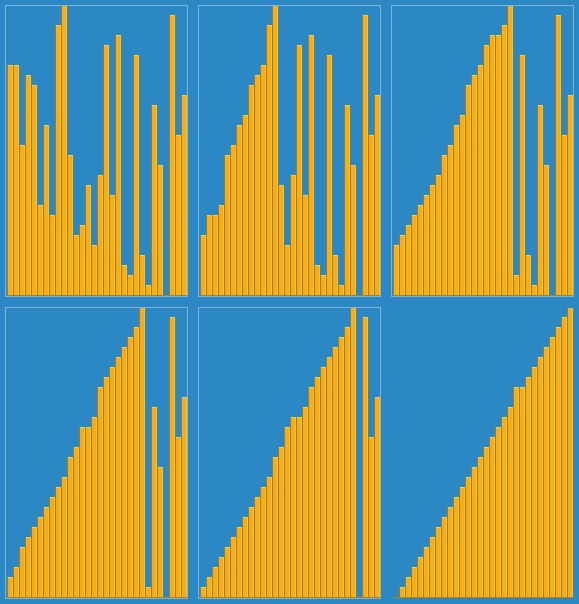
Insertion Sort

Insertion sort is a very simple sorting algorithm. It runs in O(N^2) time, which is not great as most good sorting algorithms run in O(n * lg(n)) time.

It does turn out to be a very useful though in practice because:
– It is quite efficient on small lists.
– It is stable (won’t change the relative position of elements that are the same sort value).
– It is very efficient on mostly sorted lists.
– It requires no additional memory.

The algorithm is very simple if you think about it this way:
– Iterate “i” from index 1 (0 based) to length – 1.
– In a nested loop, move from “i” backward, swapping the element from “i” downward until it is in its proper place.

import java.util.Arrays;

public class InsertionSort {
    public static void sort(int[] a) {
        int i = 1;
        while (i <a> 0 &amp;&amp; a[j-1] &gt; a[j]) {
                int tmp = a[j];
                a[j] = a[j-1];
                a[j-1] = tmp;
                j--;
            }
            ++i;
        }
    }

    public static void main(String[] args) {
        int a[] = new int[] {7, 2, 9, 1, 6, 3, 4, 5, 8};
        System.out.println(Arrays.toString(a));
        sort(a);
        System.out.println(Arrays.toString(a));
    }
}

Output

[7, 2, 9, 1, 6, 3, 4, 5, 8]
[1, 2, 3, 4, 5, 6, 7, 8, 9]

Visualization

Insertion_sort

Image taken from https://en.wikipedia.org/wiki/Insertion_sort#/media/File:Insertion_sort.gif.

Functional Permutations


What is a Permutation?

A permutation is a distinct combination of the same set of digits. For example, a permutation of “abc” is “bca”. A common computer problem is finding all possible permutations of a given string of characters. The string “abcd” would have 24 possible permutations to print out, for example.

Calculating Permutation Counts Directly

The number of permutations for a given set of characters is the factorial of the count. For example, “abcd” has 4 characters, so 4! = 4 * 3 * 2 * 1 = 24 permutations.

How Should We Generate Permutations?

You can generate permutations in a number of ways… but I think the easiest one is to use a functional paradigm. This is very similar to the approach we used in the Locker Number No Repeats problem here: https://coding-stream-of-consciousness.com/2018/09/19/locker-number-w-o-repeats/.

The approach is:
– Make a recursive helper method that takes in just the target string of characters.
– Have it call a private recursive method with 2 parameters; a string representing the currently selected characters (will be empty) and a string representing the remaining/unused characters (will be set to the input string) and return the count of the found permutations.
– Make the private recursive method taking the 2 parameters noted earlier.
– If no characters are left in the unused character list, we have a solution; print it. Also, return 1 to count that solution.
– Otherwise, cycle through the remaining characters; ror each, recursively call the function with (1) The current string + the current remaining character and (2) all remaining characters except the current one we are processing.
– Track and return the sum of solutions from all the recursive calls.

Java Implementation

public class FunctionalPermutation {

  //Recursive helper function - gets recursion started.
  public static int permute(String s) {
    if (s == null) return 0;
    return permute("", s);
  }

  private static int permute(String c, String r) {

    //If no letters remain in r, we have a solution.  Print
    //it and return 1 to count it.
    if (r.length() == 0) {
      System.out.println(c);
      return 1;
    }

    //Recurse once for each remaining letter
    //in r, adding each to the current string.
    //Pass all letters but the added one into
    //the recursive call as remaining letters.
    //Also, sum up the number of solutions.
    int sum = 0;
    for (int i = 0; i < r.length(); ++i) {
      sum += permute(c + r.charAt(i), 
        r.substring(0, i) + r.substring(i + 1));
    }
    return sum;
  }

  public static void main(String[] args) {
    System.out.println("Permutation Count: " + permute("abcd"));
  }
}

Output

dbca
dcab
dcba
Permutation Count: 24